How to Report Crypto Income From Invoices at Tax Time (2026)
A general 2026 guide to preparing crypto invoice income for tax time — the records to keep, how fiat-at-receipt values work, and how to hand clean data to your accountant. Not tax advice.
TL;DR
Reporting crypto invoice income comes down to clean records: the fiat value of each payment at the time received, the date, the invoice, and any later disposal of the asset. Get those right through the year and tax time is an export-and-hand-off; get them wrong and it's a reconstruction project. Here's the practical method. This is general information, not tax advice.
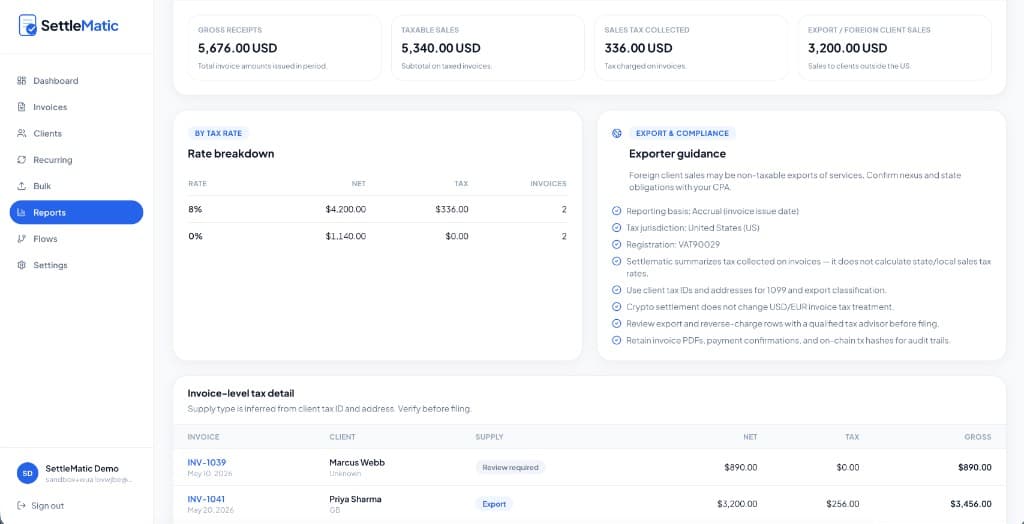
I run product at Settlematic, not an accounting firm, so this is the workflow and records view — confirm treatment with a professional.
What "good records" means
Tax authorities generally want to see income recognized at its fiat value when received. So the records that make reporting painless are:
- Fiat value at time of payment — the dollar (or local-currency) amount the crypto was worth when it landed.
- Date received — when the payment confirmed.
- Invoice reference — which invoice and client the payment maps to.
- Asset and amount — what was paid and how much.
- Any disposal events — if you later converted or spent volatile crypto, the value then, for gain/loss.
The first item is the one a bare wallet doesn't give you, which is why invoicing records matter.
The year-round method that makes tax time easy
- Invoice through a platform that records fiat-at-payment. Each payment is captured with its fiat value automatically. (Tax reporting features.)
- Reconcile monthly, not annually. Closing each month means you're not facing a year of unlabeled transfers in one sitting. See month-end reconciliation.
- Track disposals separately. When you convert crypto to fiat or spend it, note the value at that moment so any gain/loss is calculable.
- Export at year-end. A CSV with invoice numbers, fiat values, dates, and assets — ready for your accountant or software.
- Hand it to a professional. They apply your jurisdiction's rules; you provide clean data instead of a wallet history to decode.
Why monthly beats annual
The single biggest time-saver isn't a tax trick — it's cadence. Reconstructing twelve months of crypto payments at once is where people lose weekends and make errors. Closing each month keeps the dataset small and the fiat values fresh, so year-end is assembling twelve clean exports rather than excavating a year of explorer history.
The bottom line
Reporting crypto invoice income is a records problem more than a tax mystery. Capture fiat-at-payment all year, reconcile monthly, track disposals, export at year-end, and let a professional apply the rules. Run a free testnet invoice to see what a clean export looks like.
Explore Settlematic
Ready to try the workflow in your own workspace? Start on testnet, then explore our how it works guide and product features.
Frequently asked questions
- What fiat value do I report for a crypto payment?
- Generally the fair market value in your local currency on the date you received it. Record it at payment time so you're not reconstructing it later. Confirm the exact rule with a professional.
- Do I report gains if I hold the crypto?
- Often a gain or loss arises when you dispose of it (convert or spend), measured from the value at receipt. Holding stablecoins minimizes this; volatile assets can create it. Jurisdiction-dependent.
- Can my accountant work from an export?
- Yes — that's the goal. A CSV with invoice numbers, fiat values, dates, and assets gives them what they need without manual block-explorer work.