Smart invoices: automate early-payment discounts and late fees
Reward early payers and apply tiered late fees automatically with Settlematic smart invoices. Date-based pricing on crypto invoices, visible to clients before they pay.
TL;DR
Smart invoices apply tiered early-payment discounts and late fees based on calendar days from the due date. Configure org defaults once, toggle per invoice, and show the same adjustment on pay pages, PDFs, and receipts.
Last updated: June 2026.
Every finance team knows the two levers that actually move payment behavior: a carrot for paying early and a cost for paying late. The problem is that applying those levers by hand — recalculating a discount when a client pays a week ahead, tacking on a fee when an invoice slips past due — is tedious, error-prone, and almost always inconsistent. So most teams quietly stop doing it, and their Days Sales Outstanding creeps up.
Smart invoices fix that by tying pricing directly to the due date. You configure your discount and fee tiers once, flip a toggle on any unpaid invoice, and Settlematic does the arithmetic — the same way, every time, in front of both your finance team and your client. Below is how the feature works, why date-based pricing is one of the oldest and most reliable tools in accounts receivable, and how to set it up without creating problems for yourself down the line.
What a smart invoice actually does
A standard Settlematic invoice quotes a fixed amount in fiat and settles in crypto. A smart invoice adds a layer on top of that fixed amount: an adjustment that changes based on when the invoice is paid relative to its due date.
There are two directions to that adjustment:
- Early-payment discounts reduce the total when a client pays a set number of days before the due date.
- Late fees increase the total when payment lands a set number of days after the due date.
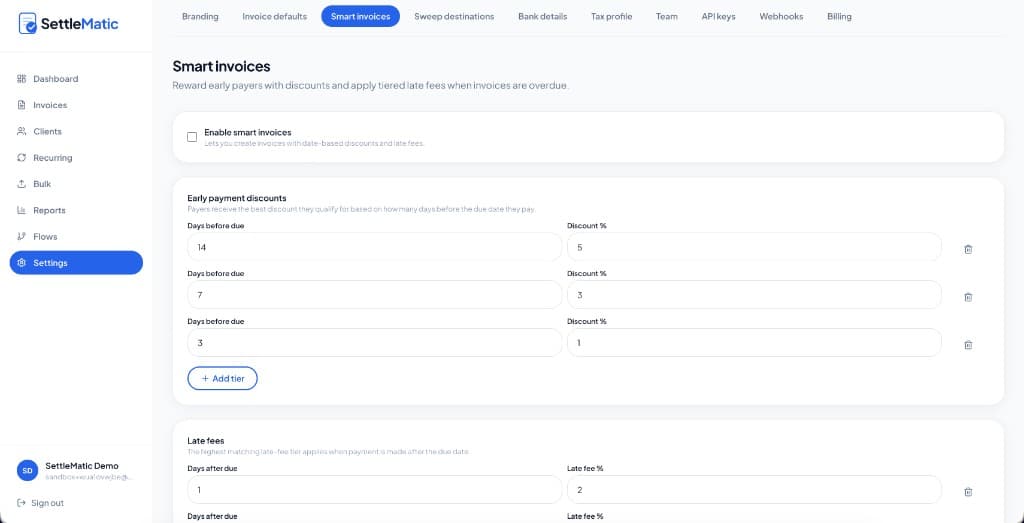
Each direction is broken into tiers. A typical early-discount structure might be 5% for paying 14 or more days early, 3% at 7 days, and 1% at 3 days. A typical late structure might be 2% after one day overdue, 5% after seven days, and 10% after fourteen. Settlematic ships with exactly these starter tiers (14/7/3-day discounts and 1/7/14-day fees) so you have a sensible default to edit rather than a blank form to fill.
The adjustment is visible everywhere money is discussed — the invoice detail view your finance team sees, the hosted payment page your client sees before sending crypto, and the PDF and receipt exports both sides keep for their records. It is not a back-office spreadsheet that only your AP clerk understands. Everyone is looking at the same number.
Why date-based pricing works (and why it's not new)
If incentivizing early payment feels familiar, that's because it predates crypto by about a century. The classic trade-credit term 2/10 net 30 — 2% off if you pay within 10 days, otherwise the full balance is due in 30 — has been standard in B2B billing for generations. It persists because it works: a modest discount routinely pulls cash forward by weeks, and pulling cash forward has real value when you'd otherwise be financing that gap yourself.
Smart invoices are the same idea, made automatic and made native to crypto settlement. The mechanics map cleanly onto two well-understood AR concepts:
Reducing Days Sales Outstanding. DSO measures how long it takes to collect after a sale. Early-payment discounts are one of the few demand-side tools that move it without souring client relationships — the client chooses to pay early because it's cheaper, rather than being chased. Tiering the discount (steeper the earlier they pay) lets you put a price on each marginal week of acceleration.
Pricing the cost of late payment. Late fees do two jobs: they compensate you for the carrying cost of an overdue balance, and they create a clear, escalating consequence that nudges the client to prioritize your invoice over others. Escalation matters — a flat fee gets absorbed and ignored, while a fee that climbs from 2% to 5% to 10% as the days pass keeps applying pressure.
None of this requires the client to do anything different. They see the effective amount due and pay it. The behavior change comes from the price, not from a follow-up email.
How the adjustment is calculated
The logic is deliberately simple, which is what makes it predictable:
- Settlematic compares today's date — or the payment date, once a payment is recorded — against the invoice due date.
- If the client is early, the best-matching early tier applies and reduces the total. If they're late, the highest matching late tier applies and increases it.
- If payment lands on the due date and no tier matches that day, the base total applies unchanged, and the pay page simply reads Pay by due date — no adjustment.
A few details worth knowing so there are no surprises:
- Tiers are counted in calendar days, not business days. A weekend counts.
- The percentage applies to the base invoice total — that is, after line items, tax, and any per-row discounts are already calculated. The smart adjustment is the last thing applied, so it's always a clean percentage of the real total.
- For on-chain and manual payments, the settlement date is what locks in the final adjustment. If a client pays a day before the early-discount cutoff, the discount they saw is the discount they get.
- Partial payments are handled tranche by tranche. Each payment reduces the smart-adjusted balance remaining, and the adjustment is recalculated using that tranche's payment date.
Because the rule is best matching tier, you never have to worry about overlapping discounts stacking or a client gaming the boundary between tiers. There is exactly one adjustment per payment.
Setting up your tiers
Org-wide defaults live in Settings → Smart invoices. Turn the feature on, then define your two tier ladders: early tiers as days before due + percent off, late tiers as days after due + percent added.
The important behavior here is snapshotting. When you create a smart invoice, Settlematic copies your current tiers onto that specific invoice. Later edits to your org defaults do not rewrite invoices that are already open. This is the correct, conservative behavior for a finance tool — it means an invoice a client agreed to last week can't silently change its discount schedule because someone adjusted a setting today. If you want different tiers going forward, edit the defaults before creating the new invoices.
On any individual unpaid invoice, the smart toggle lives in the Payment step of the invoice builder. You can switch an invoice back to standard pricing at any time while it's unpaid simply by disabling smart mode.
Transparency is the whole point
For a payment to feel fair, the person paying has to understand the number. Settlematic shows the smart adjustment as its own labeled line — for example, 7 days early — 3% discount — rather than just presenting a different total with no explanation.
That breakdown shows up consistently across every touchpoint:
- The hosted payment page displays the base total, the adjustment line, and the amount due today before the client commits any crypto.
- Invoice detail and preview PDFs show the same breakdown to your finance team.
- Receipts after payment record exactly what was owed and what was paid, so collections, AP, and treasury never argue about a discrepancy after the fact.
This alignment is what separates a smart invoice from a hidden surcharge. Both sides are looking at the same plain-language explanation of the same number.
Where smart invoices fit
A few patterns we see repeatedly:
- Agencies offering a few points off for payment within a week of sending — turning a vague please pay promptly into a concrete, automatic incentive.
- SaaS teams discouraging overdue accounts payable with escalating late fees, so the cost of slipping is built into the bill rather than negotiated after the fact.
- Consultancies mapping crypto checkout onto an existing Net-14 early-pay policy, so moving to crypto settlement doesn't mean abandoning billing terms clients already understand.
Smart invoices also work alongside the rest of the platform — partial payments, multi-asset checkout, and hosted pay pages all behave correctly with date-based pricing turned on.
A note on getting it right
Two pieces of practical advice before you switch this on across the board.
First, don't over-discount. A 5% early-pay discount is generous; offered on every invoice, it's also a real haircut on revenue. The point of tiering is to pay only for the acceleration you actually value, so reserve the steepest tier for genuinely early payment and keep the everyday tiers modest.
Second, make sure your late-fee terms are agreed up front and compliant. Late fees and finance charges are treated differently across jurisdictions — some cap the rate, most require that the charge be stated in your terms before the work is billed. Settlematic will apply whatever tiers you configure, but it can't know your contracts or your local rules. Put your late-fee schedule in your engagement terms or invoice terms so it's enforceable and never a surprise. This isn't legal advice; if you're unsure, check with someone who can advise on your specific situation.
Related features
- Crypto invoicing — professional fiat invoices with crypto settlement built in.
- Hosted payment pages — branded checkout, no wallet connect required.
- Clients and recurring billing — CRM-light client records plus automated invoice schedules.
Configure your tiers once and they're ready on every invoice you create. Start free on Settlematic and try the whole flow on testnet in a few minutes.
Explore Settlematic
Ready to try the workflow in your own workspace? Start on testnet, then explore our how it works guide and product features.
Frequently asked questions
- Can I use different tiers on different invoices?
- Tiers are snapshotted from your org settings when each smart invoice is created. To change tiers going forward, edit your org defaults before creating new invoices. Existing open smart invoices keep the tiers they were created with.
- What happens if a client pays exactly on the due date?
- If no early or late tier matches that calendar day, the base invoice total applies with no adjustment. The pay page reads Pay by due date — no adjustment.
- Do smart invoices work with partial payments?
- Yes. Each payment reduces the smart-adjusted balance due, and the adjustment is recalculated using the payment date when each tranche is recorded.
- Is the adjustment based on business days or calendar days?
- Calendar days, counted relative to the due date.
- Can I turn smart pricing off after creating an invoice?
- Yes. Any unpaid invoice can switch back to standard pricing by disabling smart mode in the invoice builder's Payment step.